The Problem with Plumbing
What I Owned
-User research & stakeholder interviews
-End-to-end service design
-UI design across 3 device types
-Competitive landscape analysis
-Information architecture
-Presentation design for final pitch
The Challenge
Unnoticed leaks from domestic plumbing cause massive property damage, financial burdens, and water waste. 13.7% of household water is lost to leaks - yet homeowners rarely know until the damage is severe.
Every existing product on the market only alerts after damage has occurred. We asked: how might we help homeowners understand their plumbing health before emergencies happen?
Technology Context
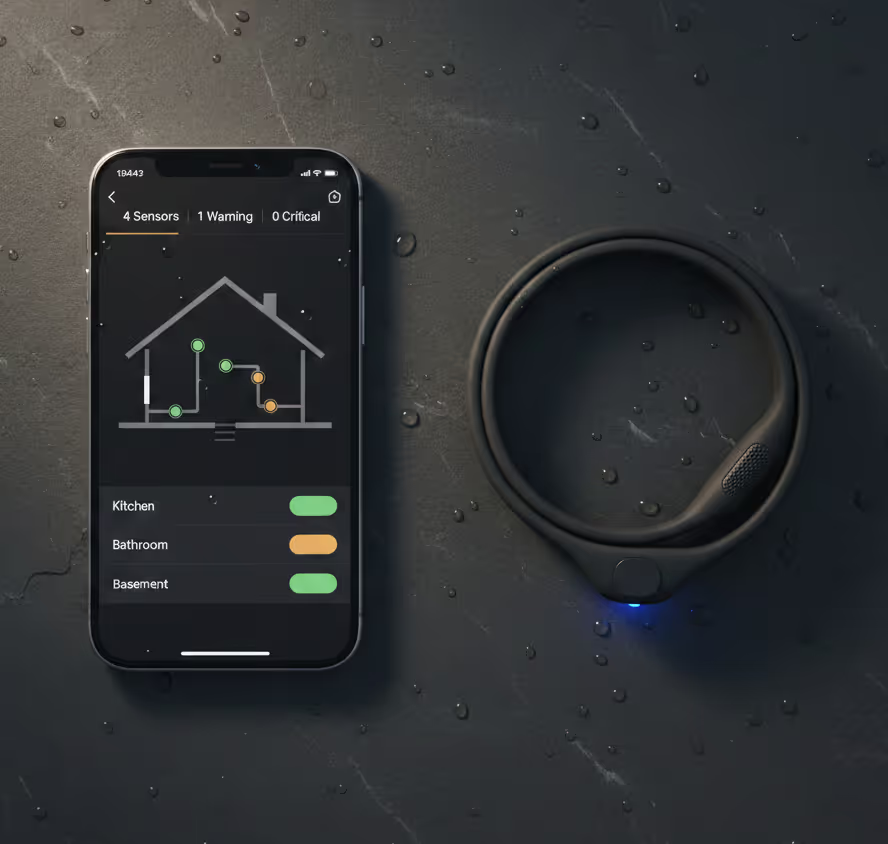
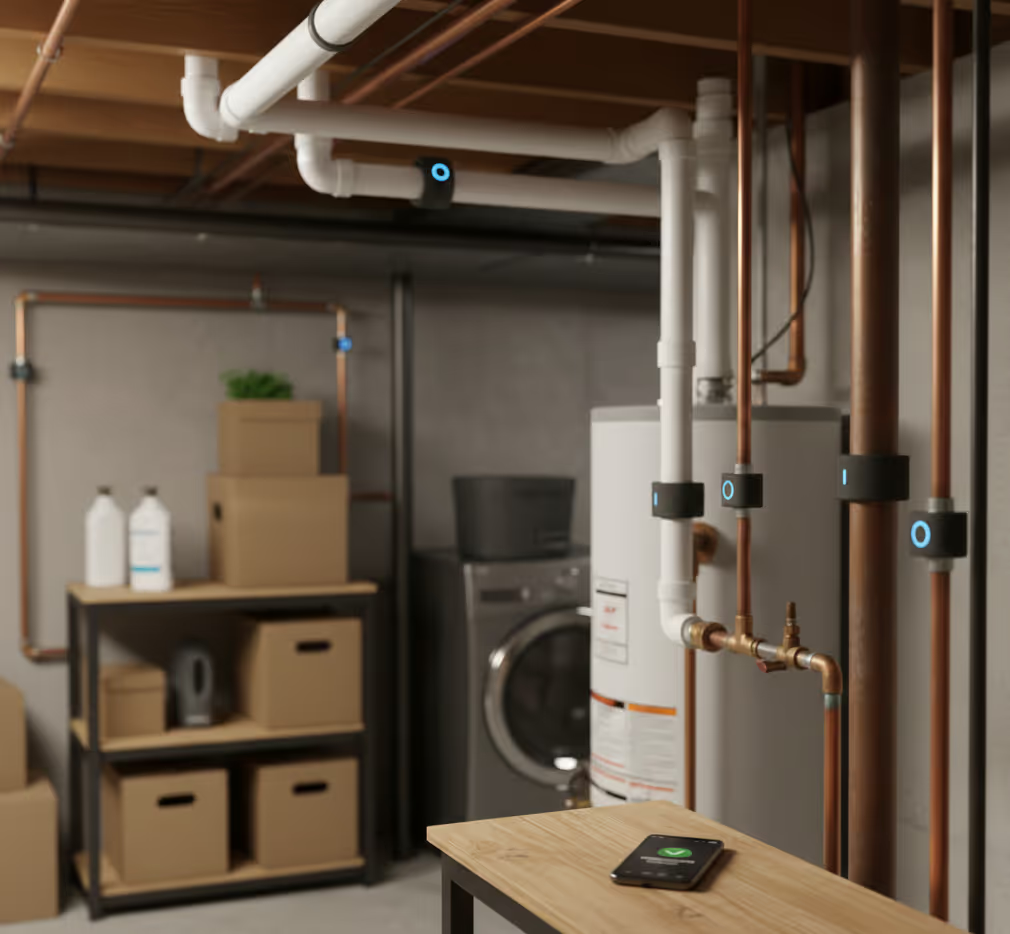
We designed around an acoustic sensing system - a flexible pipe-wrapping band with a built-in microphone that listens for anomalies like trapped air, pressure changes, water hammer, hissing from pinhole leaks, and gurgling from blockages. My focus was on translating this complex sensor data into an experience homeowners could actually understand and act on.
User Research
"First of all you can't see it. Secondly, no one knows what to look for. The average person can't identify a crack or the difference between rust from time and rust that will cause an issue."
"It's a very 'hear no evil, see no evil' issue. People want to think, if you don't know it's happening, then it doesn't exist."
Who I Designed For

Homeowner

Plumbers
Landlords

Architects
Competitive Landscape
-Every competitor shows data after the fact.
-None of the companies help users understand what's happening, why it matters, or what to do about it.
End-to-End Journey
The product isn't just an app - it's a full service experience from installation to repair. I mapped every touchpoint to identify where design could reduce friction.
Installation & Onboarding
User wraps acoustic sensors around pipes with guided placement. The app walks through room mapping, naming each fixture, and running an initial sound baseline scan.
Passive Monitoring
The system listens quietly, building a baseline of what "healthy" sounds like for this specific home. Users see a calm dashboard - no news is good news.
Issue Detection & Notification
When an acoustic anomaly is detected - trapped air, unusual flow patterns, pressure changes - the system classifies it and sends a push notification with a clear explanation.
Diagnosis & Recommendation
The detail view shows what the issue is, where it is, how urgent it is with a predictive timeline, and what the repair would cost now vs. later.
Repair & Handoff
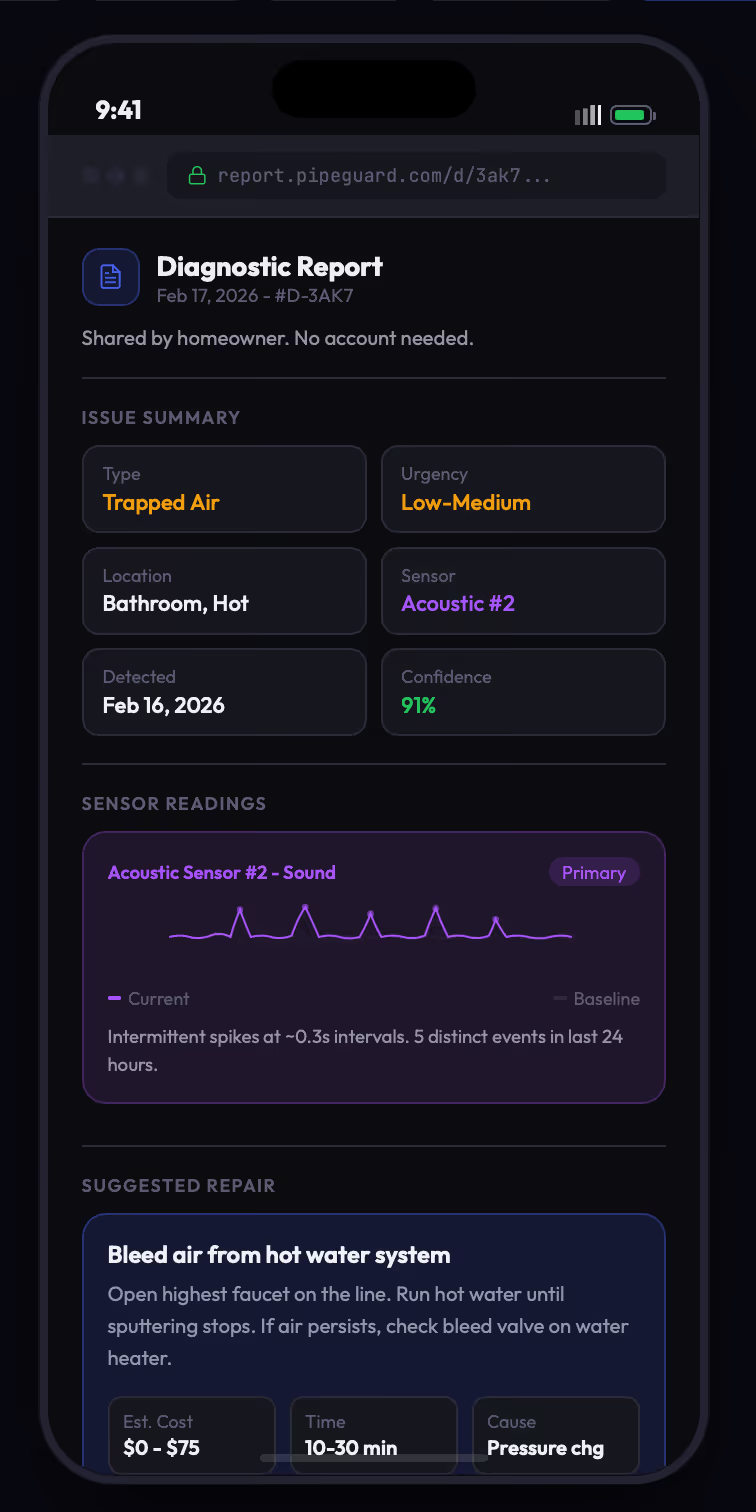
The user shares a diagnostic report with a plumber via link. The plumber sees sensor data, sound comparisons, and suggested repair. No app download needed.
Key Design Decisions
The hardest part of this project wasn't the technology - it was translating complex acoustic data into something a homeowner could understand without being a plumber.
Why acoustic-only instead of adding a camera?
We initially explored computer vision for detecting visual pipe changes like rust. But in practice, most pipes are behind walls or in dark spaces where a camera is impractical. Acoustic sensing covers more ground - leaks, air pockets, pressure, blockages - from a single non-invasive band. Dropping the camera simplified the hardware, reduced cost, and kept the product focused.
How do we communicate what a sound anomaly means?
A waveform showing 2.4kHz frequency spikes means nothing to a homeowner. We translate every acoustic anomaly into plain language: "trapped air in the pipe near your kitchen sink." The raw data is available behind an expandable "Technical Details" section for when a plumber needs it.
How do we balance alerting without alarming?
Air trapped in a pipe doesn't need the same tone as active water hammer at 2am. We designed a gradient from green to red with a timeline showing "this is where you are now" vs. "this is where it's heading." Gives users agency to decide when to act.
How do we design for the plumber handoff?
A plumber doesn't want to download an app. We designed a web-based report they can open from any link - showing the issue type, location, acoustic data, and baseline comparisons. The plumber arrives knowing what tools to bring.
Interface Design
A companion app that gives homeowners full visibility into their plumbing system - from real-time acoustic monitoring to predictive alerts and repair coordination.
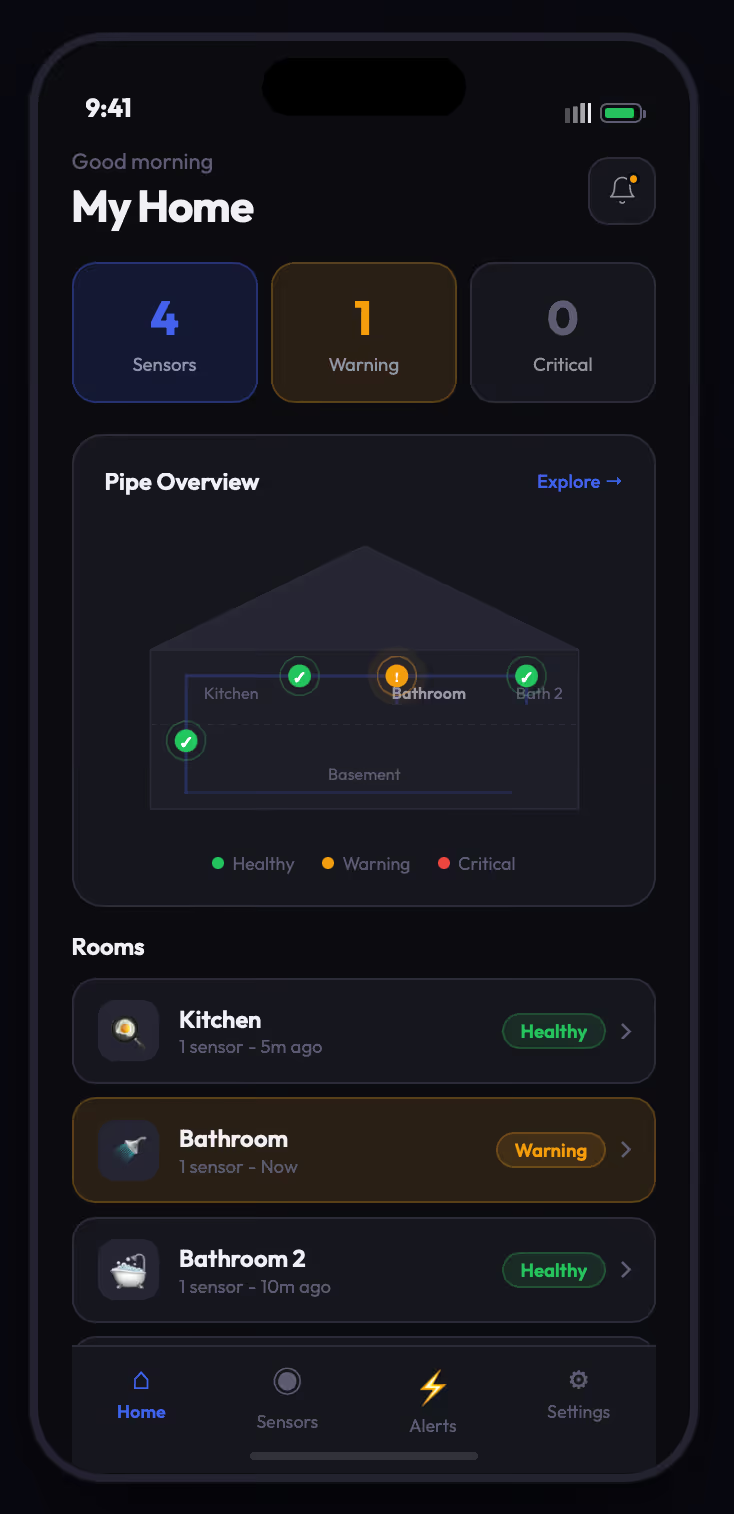
Home Dashboard
Acoustic Health Overview
A house diagram shows all sensor placements across rooms. Status indicators show sensor count, active warnings, and critical alerts. Users can tap a room to see acoustic trends and individual sensor data.
Onboarding Flow
Guided Setup
A step-by-step wizard walks the homeowner through sensor placement. Each step shows where to wrap the band, confirms connection via a test sound, and lets the user name each fixture.

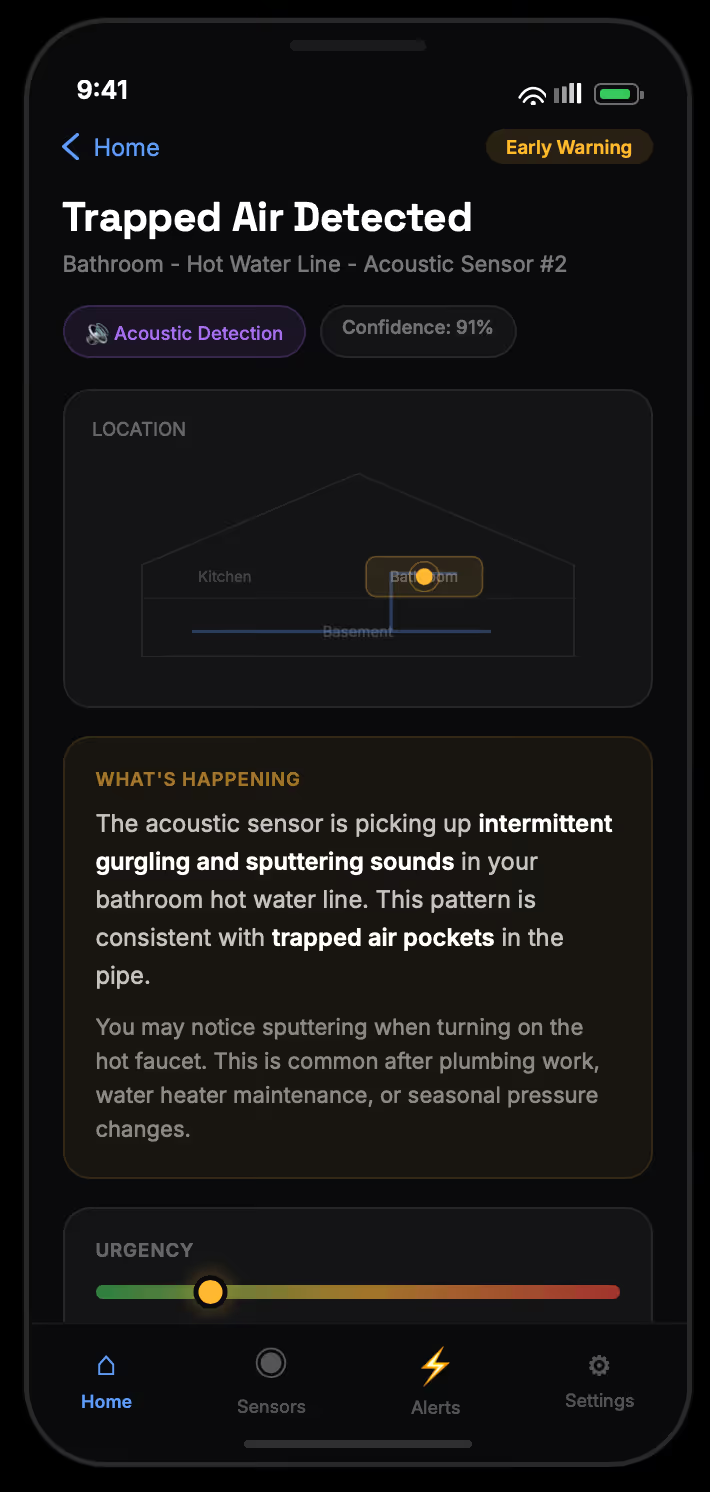
Issue Detection
Acoustic Anomaly Alert
When the system detects an anomaly - like trapped air creating a rhythmic hammering pattern - the detail view translates it into plain language, shows an urgency spectrum with predictive timeline, and compares the repair cost of acting now vs. waiting.
Sound Comparison
Baseline vs. Current
Users and plumbers can listen to and see waveform visualizations comparing the healthy baseline sound with the current anomaly. A clear "here's what changed" summary accompanies the visual.

Plumber Handoff
Shareable Report
A web-based diagnostic report the homeowner shares via link. Contains issue type, location, acoustic data, baseline comparison, and suggested repair with cost and tools. No app download required.
Outcome
Selected from competing teams for the strongest combination of problem framing, technical feasibility, and design execution.
"It's 2030. A homeowner walks in after work. Her digital assistant tells her that an unusual sound pattern was detected near the basement pipe junction - likely early-stage air trapped in the line. The diagnostic report is already in her portal. The assistant offers to schedule a plumber for tomorrow morning."
What I Learned